and runs during HTML parse, but hubspotutk is set by js.hs-analytics.net, measured loading at ~834ms. On a first visit the cookie does not exist yet, so a single read returns nothing and the visitor gets no external ID at all — and a first visit is exactly what an ad click is. So poll briefly until HubSpot sets it. The SDK loads lazily (~4.5s) and replays a queue, so an init queued a second or two in still lands before any events are transmitted. */ (function attachExternalId() { var attempts = 0; var MAX_ATTEMPTS = 40; /* 40 x 200ms = 8s, then give up quietly */ var timer = null; function tryAttach() { var raw = getExternalId(); if (!raw) { if (++attempts >= MAX_ATTEMPTS && timer) clearInterval(timer); return; } if (timer) clearInterval(timer); sha256Hex(raw).then(function (hash) { oaiq("init", { user: { external_id_sha256: hash } }); }).catch(function () {}); } tryAttach(); /* returning visitor: immediate */ if (!getExternalId()) timer = setInterval(tryAttach, 200); })(); /* --------------------------------------------------------------------------- 2. Load the SDK off the critical path Whichever comes first: the main thread going idle after load, or the first sign of real user intent. No preconnect on purpose — a TLS handshake during LCP for a script we deliberately deferred is a net loss. Measured on clickpost.ai: load event 3614ms, SDK fetched 4508ms. ------------------------------------------------------------------------ */ var loaded = false; var INTENT = ["pointerdown", "keydown", "scroll"]; function loadSdk() { if (loaded) return; loaded = true; INTENT.forEach(function (t) { removeEventListener(t, loadSdk, { passive: true }); }); var s = document.createElement("script"); s.src = SDK; s.async = true; s.fetchPriority = "low"; document.head.appendChild(s); } INTENT.forEach(function (t) { addEventListener(t, loadSdk, { passive: true, once: true }); }); addEventListener("load", function () { window.requestIdleCallback ? requestIdleCallback(loadSdk, { timeout: 2500 }) : setTimeout(loadSdk, 1500); }, { once: true }); /* --------------------------------------------------------------------------- 3. Conversion id sha256(lowercase(email) + "|" + formId + "|" + ISO-hour), first 20 hex, "lead_" prefix. - email lowercased/trimmed so casing does not fork the id - formId keeps two different forms in the same hour from colliding - the hour bucket is only the server's fallback; the id computed here is sent to the relay verbatim, so the two paths cannot disagree even when a submit straddles an hour boundary Ads Manager's own sample omits event_id. We send it so the pixel event and the relay event collapse into one conversion instead of counting twice. ------------------------------------------------------------------------ */ function buildEventId(email, formId) { var seed = [ String(email || "").trim().toLowerCase(), String(formId || ""), new Date().toISOString().slice(0, 13) ].join("|"); return crypto.subtle.digest("SHA-256", new TextEncoder().encode(seed)).then(function (buf) { var hex = Array.prototype.map.call(new Uint8Array(buf), function (b) { return b.toString(16).padStart(2, "0"); }).join(""); return "lead_" + hex.slice(0, 20); }); } /* Guards a re-fire from the history.pushState that book-a-demo-core.js runs after submit, and from back-navigation onto the same state. */ function firedOnce(id) { try { if (sessionStorage.getItem("oaiq_" + id)) return true; sessionStorage.setItem("oaiq_" + id, "1"); return false; } catch (e) { return false; /* private mode / blocked storage: fire rather than lose it */ } } /* Path 2. keepalive lets the request finish even if the page navigates away. Failures are swallowed deliberately: a reporting call must never surface an error to someone who just submitted a form. The relay hashes the email server-side into user.emails_sha256 and adds the caller's IP and user agent, so this event carries the same match signals the pixel gets for free. */ function sendToRelay(email, formId, eventType, eventId) { try { var payload = { token: RELAY_TOKEN, email: email, form_id: formId || "", event_type: eventType, event_id: eventId, /* verbatim, so both paths always match */ source_url: location.href }; var oppref = getOppref(); if (oppref) payload.oppref = oppref; var externalId = getExternalId(); if (externalId) payload.external_id = externalId; fetch(RELAY_URL, { method: "POST", keepalive: true, headers: { "Content-Type": "application/json" }, body: JSON.stringify(payload) }).catch(function () {}); } catch (e) {} } /* Capture the email while the form is still on the page. onFormSubmitted does not reliably carry submissionValues, and by then the form may be removed. */ var lastEmail = ""; document.addEventListener("submit", function (e) { var f = e.target; if (!f || !f.querySelector) return; var i = f.querySelector('input[name="email"], input[type="email"]'); if (i && i.value) lastEmail = i.value; }, true); /* Every HubSpot form on the site reports through this one message event, so no module or theme JS needs editing to add coverage. */ window.addEventListener("message", function (e) { var d = e.data; if (!d || d.type !== "hsFormCallback" || d.eventName !== "onFormSubmitted") return; var email = (d.data && d.data.submissionValues && d.data.submissionValues.email) || lastEmail; if (!email) return; /* without an email there is no stable id to dedupe on */ var eventType = EVENT_BY_FORM[d.id] || EVENT_DEFAULT; buildEventId(email, d.id).then(function (id) { if (firedOnce(id)) return; oaiq("measure", eventType, { type: DATA_TYPE }, { event_id: id }); /* path 1 */ sendToRelay(email, d.id, eventType, id); /* path 2 */ }); }); })();

91ÊÓƵ

See where your logistics stands on automation Start assessment

Starlinks Tracking and API Integration with ClickPost

Lower shipping expenses by up to 30% with ClickPost’s smart carrier allocation.

starlink-integration

Trusted by 450+ global brands

Starlinks Tracking

*ClickPost provides package tracking services only. For inquiries about order details, please contact your retailer.
starlink-clickpost

Benefits of Connecting with Starlinks through ClickPost

Harness the combined strength of Starlinks and ClickPost to take your logistics operations to the next level. 

  • Bring down RTOs by 40% with automated NDR resolutions. 
  • Achieve a 40% NPS improvement with automated branded tracking and notifications. 
  • Lower WISMO queries by 76% and maintain brand loyalty. 

Check the integration library

Partner ID Order Creation Cancellation Tracking via Polling Tracking via Webhook Proof of Delivery (POD) Non Delivery Report (NDR) Create Pickup Request AWB Generation Flow Label Generation Country
starlinks-logo
Starlinks
✓ ✓ ✓ ✓ ✓ ✓ ✓ Clickpost Generated India

How to Track Starlinks Packages

Track Starlinks Packages with the ClickPost Tracking Page

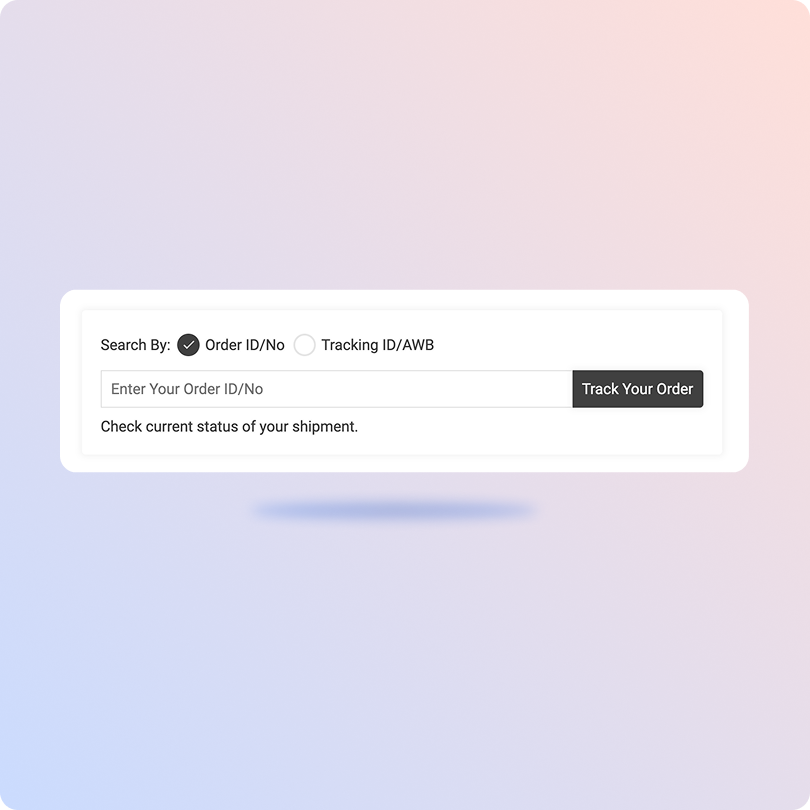
  • Get the order IDs for Starlinks packages and copy them. 
  • Head over to the official tracking portal of ClickPost. 
  • Paste the order IDs in the box. 
  • Hit “Track Your Order” to monitor the end-to-end shipment journey. 
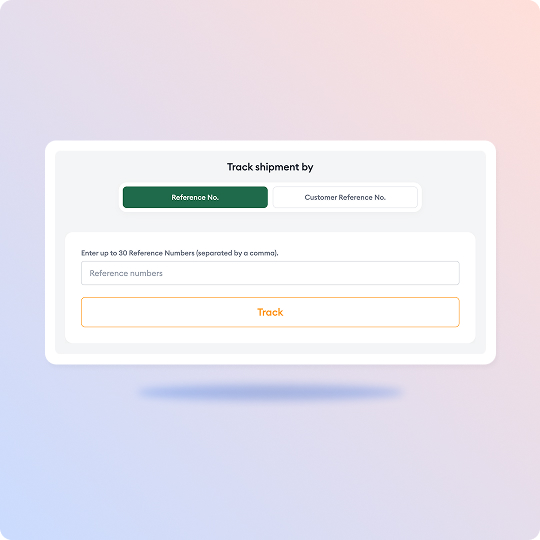
Track Starlinks Packages on the Official Page

  • Visit Starlinks’ official tracking portal. 
  • Enter the reference numbers in the given box. You can track your shipment by using reference numbers or customer reference numbers. Plus, you can add up to 30 reference numbers, each separated by a comma. 
  • Hit “Track.”
  • After a few seconds, you will be able to track the shipment journey. 

List of Starlinks APIs

API Description
Manifestation and shipping label generation API Ship faster with Starlinks by auto-generating shipping labels and AWB numbers.
Track Shipment API Oversee shipments across multiple carriers and manage them efficiently on a unified portal.
Cancellation API Cancel already manifested orders effortlessly with this API.
EDD API Keep customers informed with accurate delivery timelines and win their trust.
NDR Action Update Auto-detect NDR cases and automate the entire management process to bring down RTOs.
Return Webhooks Track every customer return and refund with Starlinks-integrated ebooks.
API & Description
Manifestation and shipping label generation API
Ship faster with Starlinks by auto-generating shipping labels and AWB numbers.
Track Shipment API
Oversee shipments across multiple carriers and manage them efficiently on a unified portal.
Cancellation API
Cancel already manifested orders effortlessly with this API.
EDD API
Keep customers informed with accurate delivery timelines and win their trust.
NDR Action Update
Auto-detect NDR cases and automate the entire management process to bring down RTOs.
Return Webhooks
Track every customer return and refund with Starlinks-integrated ebooks.

Frequently asked questions

Everything you need to know about ClickPost’s Carriers Integration

How does ClickPost integrate with Starlinks to enable real-time tracking of shipments?

ClickPost integrates with Starlinks through a universal API. Because of this, enterprises can go live with Starlinks through ClickPost by making simple configuration changes. To integrate this API, simply go through the API documentation and secure the necessary API credentials. Use these credentials while setting up the carrier authentication mechanism on ClickPost’s dashboard. Once the integration is done, ClickPost’s tracking APIs will automatically fetch real-time updates from Starlinks and show them on a unified dashboard.

Can ClickPost users generate manifests and labels automatically for Starlinks orders?

Yes! Users can easily automate generating manifests and labels for Starlinks orders using ClickPost’s order manifestation and label generation API. They can also generate bulk labels to speed up order fulfillment.

What kind of tracking statuses and delivery insights does ClickPost provide for Starlinks?

ClickPost provides milestone-specific delivery updates along with chronological timestamps on the dashboard. These statuses mostly include Order Created, Picked Up, Shipped, In Transit, Out for Delivery, Delivered, etc. Plus, merchants will also view updates on delays, exceptions, and reattempts. In addition, ClickPost offers detailed insights and reports for Starlinks’ performance, such as OFD reports, RTO reports, SLA breach reports, in-transit order reports, on-time delivery reports, and so on.

Is it possible to handle delivery exceptions with Starlinks using ClickPost’s workflow automation?

Of course! Using ClickPost’s automated NDR management system, enterprises can handle delivery exceptions automatically for Starlinks shipments. After auto-detecting the NDR cases, ClickPost updates the carriers’ databases in real time with recent reports. Next, it automates the entire feedback loop, so carriers can make reattempts. It has also launched its AI delivery exceptions manager, Parth, to automate 90% of NDR resolutions and bring down RTOs.

What is Starlinks?

Founded in 2019, Stralinks is a well-known supply chain company operating across Saudi Arabia and the GCC. Their core capabilities lie in providing high-quality omnichannel fulfillment services and transportation services across this region. Starlinks offers specialized e-commerce solutions to help businesses build and optimize their supply chain operations. It has an extensive fleet of 150+ vehicles and a track record of managing 30k orders a day. It has also introduced 254 robots to automate fulfillment. Besides these, Starlinks provides same-day delivery, bulk delivery, cash-on-delivery, international shipping, returns management, and more. Under the B2B logistics, you will find services such as local and intracity distribution, multi-temperature controlled facilities, 4PL solutions, automotive yard solutions, and more. Stralinks delivers 400 tons of cargo, 15,000+ TEUs, and 2,000 cross-border linehauls through its robust freight forwarding services. Plus, Starlinks offers supply chain solutions, such as analysis of existing data sources, supply chain strategy development, and more, to revolutionize your end-to-end business operations.

Streamline your shipping experience with ClickPost

image (3)-3
. window.disableHubSpotCookieBanner = true; function killNative() { var n = document.getElementById("hs-eu-cookie-confirmation"); if (n && n.parentNode) { n.parentNode.removeChild(n); return true; } return false; } killNative(); if (window.MutationObserver) { var mo = new MutationObserver(function () { killNative(); }); mo.observe(document.documentElement, { childList: true, subtree: true }); setTimeout(function () { mo.disconnect(); }, 15000); } var COOKIE = "cp_cookie_consent"; var EU = ["at","be","bg","hr","cy","cz","dk","ee","fi","fr","de","gr","hu","ie","it","lv","lt","lu","mt","nl","pl","pt","ro","sk","si","es","se","gb","uk","is","li","no","ch"]; function readCookie(nm) { var m = document.cookie.match(new RegExp("(?:^|; )" + nm + "=([^;]*)")); return m ? decodeURIComponent(m[1]) : null; } function writeCookie(nm, val, days) { var d = new Date(); d.setTime(d.getTime() + (days * 864e5)); document.cookie = nm + "=" + encodeURIComponent(val) + ";expires=" + d.toUTCString() + ";path=/;SameSite=Lax" + (location.protocol === "https:" ? ";Secure" : ""); } function stored() { var raw = readCookie(COOKIE); if (!raw) return null; try { var o = JSON.parse(raw); if (typeof o.analytics === "boolean") return o; } catch (e) {} return null; } function apply(state, revoke) { window._hsp = window._hsp || []; window._hsp.push(["setHubSpotConsent", { analytics: !!state.analytics, advertisement: !!state.advertisement, functionality: !!state.functionality }]); if (revoke && !state.analytics && !state.advertisement && !state.functionality) { window._hsp.push(["revokeCookieConsent"]); } window.dataLayer = window.dataLayer || []; window.dataLayer.push({ event: "cp_cookie_consent", cp_consent_analytics: !!state.analytics, cp_consent_advertisement: !!state.advertisement, cp_consent_functionality: !!state.functionality }); document.documentElement.setAttribute("data-cp-consent", "set"); } function inScope(banner) { if (banner.getAttribute("data-scope") !== "eu_only") return true; var geo = (document.body.getAttribute("data-geo_location") || "").toLowerCase(); if (!geo) return true; return EU.indexOf(geo) !== -1; } function init(banner) { var days = parseInt(banner.getAttribute("data-days"), 10) || 180; var prefs = banner.querySelector("[data-cpcb-prefs]"); var compact = banner.querySelector('[data-cpcb-actions="compact"]'); var expanded = banner.querySelector('[data-cpcb-actions="expanded"]'); var toggles = banner.querySelectorAll("[data-cpcb-toggle]"); function show() { banner.hidden = false; requestAnimationFrame(function () { banner.classList.add("is-visible"); }); } function hide() { banner.classList.remove("is-visible"); setTimeout(function () { banner.hidden = true; }, 300); } function collapse() { if (!prefs) return; prefs.hidden = true; if (expanded) expanded.hidden = true; if (compact) compact.hidden = false; } function expand() { if (!prefs) return; prefs.hidden = false; if (compact) compact.hidden = true; if (expanded) expanded.hidden = false; } function paint(state) { Array.prototype.forEach.call(toggles, function (t) { var key = t.getAttribute("data-cpcb-toggle"); if (key === "necessary") { t.setAttribute("aria-checked", "true"); return; } t.setAttribute("aria-checked", state[key] ? "true" : "false"); }); } function fromToggles() { var state = { analytics: false, advertisement: false, functionality: false }; Array.prototype.forEach.call(toggles, function (t) { var key = t.getAttribute("data-cpcb-toggle"); if (key in state) state[key] = t.getAttribute("aria-checked") === "true"; }); return state; } function commit(state, revoke) { writeCookie(COOKIE, JSON.stringify({ analytics: !!state.analytics, advertisement: !!state.advertisement, functionality: !!state.functionality, v: 1, ts: Date.now() }), days); apply(state, revoke); hide(); } Array.prototype.forEach.call(toggles, function (t) { if (t.disabled) return; t.addEventListener("click", function () { t.setAttribute("aria-checked", t.getAttribute("aria-checked") === "true" ? "false" : "true"); }); }); banner.addEventListener("click", function (e) { if (!e.target || !e.target.closest) return; var btn = e.target.closest("[data-cpcb-action]"); if (!btn) return; var action = btn.getAttribute("data-cpcb-action"); if (action === "customise") { expand(); return; } if (action === "accept") { commit({ analytics: true, advertisement: true, functionality: true }, false); return; } if (action === "reject") { commit({ analytics: false, advertisement: false, functionality: false }, true); return; } if (action === "save") { commit(fromToggles(), true); return; } }); var existing = stored(); if (existing) { apply(existing, false); paint(existing); collapse(); } else if (!inScope(banner)) { // Out of the consent-required region: implied consent, banner never shown. commitSilently(); } else { collapse(); show(); } function commitSilently() { var all = { analytics: true, advertisement: true, functionality: true }; writeCookie(COOKIE, JSON.stringify({ analytics: true, advertisement: true, functionality: true, v: 1, ts: Date.now(), implied: true }), days); apply(all, false); } // Public re-open hook for a footer "Cookie settings" link. window.cpCookieBanner = window.cpCookieBanner || {}; window.cpCookieBanner.open = function () { var s = stored() || { analytics: false, advertisement: false, functionality: false }; paint(s); expand(); show(); }; } function boot() { var banners = document.querySelectorAll("[data-cpcb]"); if (!banners.length) return; init(banners[0]); document.addEventListener("click", function (e) { if (!e.target || !e.target.closest) return; var trigger = e.target.closest("[data-cp-cookie-settings]"); if (!trigger) return; e.preventDefault(); if (window.cpCookieBanner && window.cpCookieBanner.open) window.cpCookieBanner.open(); }); } if (document.readyState === "loading") { document.addEventListener("DOMContentLoaded", boot); } else { boot(); } })();