and runs during HTML parse, but hubspotutk is set by js.hs-analytics.net, measured loading at ~834ms. On a first visit the cookie does not exist yet, so a single read returns nothing and the visitor gets no external ID at all — and a first visit is exactly what an ad click is. So poll briefly until HubSpot sets it. The SDK loads lazily (~4.5s) and replays a queue, so an init queued a second or two in still lands before any events are transmitted. */ (function attachExternalId() { var attempts = 0; var MAX_ATTEMPTS = 40; /* 40 x 200ms = 8s, then give up quietly */ var timer = null; function tryAttach() { var raw = getExternalId(); if (!raw) { if (++attempts >= MAX_ATTEMPTS && timer) clearInterval(timer); return; } if (timer) clearInterval(timer); sha256Hex(raw).then(function (hash) { oaiq("init", { user: { external_id_sha256: hash } }); }).catch(function () {}); } tryAttach(); /* returning visitor: immediate */ if (!getExternalId()) timer = setInterval(tryAttach, 200); })(); /* --------------------------------------------------------------------------- 2. Load the SDK off the critical path Whichever comes first: the main thread going idle after load, or the first sign of real user intent. No preconnect on purpose — a TLS handshake during LCP for a script we deliberately deferred is a net loss. Measured on clickpost.ai: load event 3614ms, SDK fetched 4508ms. ------------------------------------------------------------------------ */ var loaded = false; var INTENT = ["pointerdown", "keydown", "scroll"]; function loadSdk() { if (loaded) return; loaded = true; INTENT.forEach(function (t) { removeEventListener(t, loadSdk, { passive: true }); }); var s = document.createElement("script"); s.src = SDK; s.async = true; s.fetchPriority = "low"; document.head.appendChild(s); } INTENT.forEach(function (t) { addEventListener(t, loadSdk, { passive: true, once: true }); }); addEventListener("load", function () { window.requestIdleCallback ? requestIdleCallback(loadSdk, { timeout: 2500 }) : setTimeout(loadSdk, 1500); }, { once: true }); /* --------------------------------------------------------------------------- 3. Conversion id sha256(lowercase(email) + "|" + formId + "|" + ISO-hour), first 20 hex, "lead_" prefix. - email lowercased/trimmed so casing does not fork the id - formId keeps two different forms in the same hour from colliding - the hour bucket is only the server's fallback; the id computed here is sent to the relay verbatim, so the two paths cannot disagree even when a submit straddles an hour boundary Ads Manager's own sample omits event_id. We send it so the pixel event and the relay event collapse into one conversion instead of counting twice. ------------------------------------------------------------------------ */ function buildEventId(email, formId) { var seed = [ String(email || "").trim().toLowerCase(), String(formId || ""), new Date().toISOString().slice(0, 13) ].join("|"); return crypto.subtle.digest("SHA-256", new TextEncoder().encode(seed)).then(function (buf) { var hex = Array.prototype.map.call(new Uint8Array(buf), function (b) { return b.toString(16).padStart(2, "0"); }).join(""); return "lead_" + hex.slice(0, 20); }); } /* Guards a re-fire from the history.pushState that book-a-demo-core.js runs after submit, and from back-navigation onto the same state. */ function firedOnce(id) { try { if (sessionStorage.getItem("oaiq_" + id)) return true; sessionStorage.setItem("oaiq_" + id, "1"); return false; } catch (e) { return false; /* private mode / blocked storage: fire rather than lose it */ } } /* Path 2. keepalive lets the request finish even if the page navigates away. Failures are swallowed deliberately: a reporting call must never surface an error to someone who just submitted a form. The relay hashes the email server-side into user.emails_sha256 and adds the caller's IP and user agent, so this event carries the same match signals the pixel gets for free. */ function sendToRelay(email, formId, eventType, eventId) { try { var payload = { token: RELAY_TOKEN, email: email, form_id: formId || "", event_type: eventType, event_id: eventId, /* verbatim, so both paths always match */ source_url: location.href }; var oppref = getOppref(); if (oppref) payload.oppref = oppref; var externalId = getExternalId(); if (externalId) payload.external_id = externalId; fetch(RELAY_URL, { method: "POST", keepalive: true, headers: { "Content-Type": "application/json" }, body: JSON.stringify(payload) }).catch(function () {}); } catch (e) {} } /* Capture the email while the form is still on the page. onFormSubmitted does not reliably carry submissionValues, and by then the form may be removed. */ var lastEmail = ""; document.addEventListener("submit", function (e) { var f = e.target; if (!f || !f.querySelector) return; var i = f.querySelector('input[name="email"], input[type="email"]'); if (i && i.value) lastEmail = i.value; }, true); /* Every HubSpot form on the site reports through this one message event, so no module or theme JS needs editing to add coverage. */ window.addEventListener("message", function (e) { var d = e.data; if (!d || d.type !== "hsFormCallback" || d.eventName !== "onFormSubmitted") return; var email = (d.data && d.data.submissionValues && d.data.submissionValues.email) || lastEmail; if (!email) return; /* without an email there is no stable id to dedupe on */ var eventType = EVENT_BY_FORM[d.id] || EVENT_DEFAULT; buildEventId(email, d.id).then(function (id) { if (firedOnce(id)) return; oaiq("measure", eventType, { type: DATA_TYPE }, { event_id: id }); /* path 1 */ sendToRelay(email, d.id, eventType, id); /* path 2 */ }); }); })();

91ÊÓÆµ

See where your logistics stands on automation Start assessment

Home > Blog >

How To Print Shipping Labels For Small Business

How To Print Shipping Labels For Small Business

Devaraj Mahantesh
By Devaraj Mahantesh

Ready to ship smarter? Talk to our logistics experts.

Trusted by 600+ brands

In this blog

    Getting a product to reach the customer's location at the right time is probably the most challenging phase in order fulfilment. To ensure there are no bottlenecks, firms tend to print shipping labels on their products. 

    For small businesses that cannot afford to sign up on apps that specialise in label printing, this can be rather tough. However, instead of relying on such apps, smaller sized businesses can decide to print their own shipping labels and get the job done. 

    Let's go over how exactly shipping labels matter for small-sized firms and how they can print their own. 

    How Important Is A Shipping Label For A Small Business?

    Shipping labels are crucial regardless of the scale of one's business. This is because it contains essential information about the consignor and consignee. Having data on both parties helps in cases of returns too. 

    In addition, shipping labels give your shipment a professional look while also helping you add your logo to increase brand awareness. You can use a to create a unique and professional logo that enhances your brand identity. Further, a shipping label is transparent and displays the type of service your customer asked for and paid for (express or standard delivery). 

    In fact, shipping labels also help small businesses get discounts on postages via the IMpb barcode, made mandatory by the USPS.

    Things That Make Up a Shipping Label

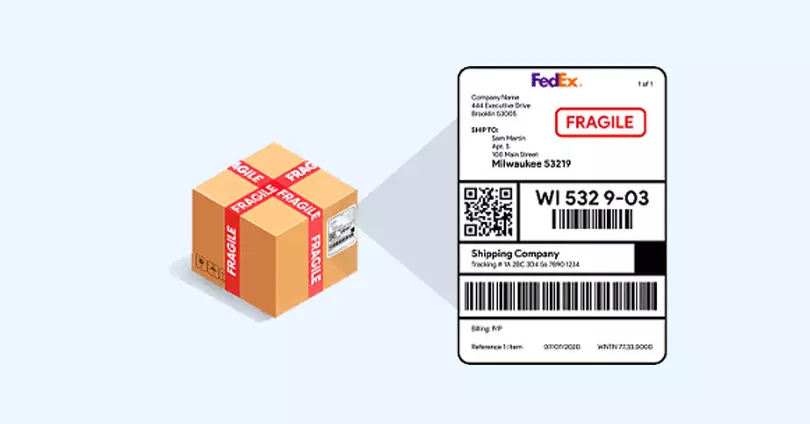
    For beginners, it's natural to be unaware of the details that may go on a shipping label. To help you learn more, here's a list of the different kinds of information that a shipping label will contain. 

    This list should also give you an idea of why it's preferred to 'print' these labels rather than making them on your own. 

    1. Icon

    The first thing you'll ever notice is a massive icon on the top left corner of a shipping label. This icon represents the type of service used for the package. 

    2. Postage Payment

    On the right side of the icon mentioned earlier comes your payment details. These do not include the order payment details, i.e., the transaction your customer made. 

    Instead, it contains information about the postage fee that you pay. This section will display whether you've paid for the postage online or in person. 

    3. Service Subclass

    Below the primary service icon and postage, payment details are the subclass of the type of service. This particular banner helps distinguish between prioritised packages. 

    4. Address Details of the Sender

    Right under the service subclass banner is your address. This section is usually printed with a smaller font size since it isn't the most important thing on the label. However, it is a requirement in the case of returns. 

    5. Additional Service

    Okay, we promise, this is the last type of 'service' you'll see on a shipping label. Additional services requested by your customers are printed below your address in slightly larger font size. These can contain services such as returns, address changes, etc. 

    6. Shipping Address

    You guessed it right, the shipping address is your customer's location or wherever they wish for their product to be delivered. Shipping addresses have a large font size to help your carrier understand the destination correctly.

    7. IMpb Code

    The IMpb code is mandatory (enforced by the USPS) for small-sized firms to receive discounts and ease shipment tracking. It's in the form of a barcode placed towards the bottom half of your shipping label.  

    8. Branding 

    The part you're probably itching to add is your brand logo/tagline. This doesn't necessarily need to be at the end of your shipping label. Many firms even prefer to add their brand details at the top to increase the chances of being noticed. This part is all yours, so let your creative juices flow! Some businesses also enhance customer experience by adding QR codes next to their branding. These can link to order tracking pages, review forms, or return instructions. Tools like , platforms like Canva, and Shopify’s native tools can help you generate such codes easily. Just make sure they’re placed in a scannable area without overlapping vital shipping info.

    How To Print Shipping Labels

    We know what a shipping label is, why small businesses need it and the kind of information it contains. Now it's time to see how you can print your shipping label!

    First things first, you need papers of accurate sizes. Generally, shipping labels come in the dimensions of 4 x 6 (in inches) and 5.5 x 8.5. You can print a label in either a; laser printer, ink-jet printer or direct thermal printer.

    The former two types of printers aren't best suited for labels and can be expensive for startups. However, direct thermal printers provide smudge-free prints and are less expensive than the other two. 

    However, you should note that not all direct thermal printers may be capable of printing more than four inches of paper, so pick one which supports your paper dimensions and carrier website. 

    Best Carrier Options for Small Businesses

    Today, several carriers offer impressive packages for small businesses, but not all may be appropriate for shipping your products. 

    To break it down, delivery service is an essential part of the entire shipment process, so you wouldn't want to regret anything when it comes to this. Also, it's only a given that you'll scrutinise a list of factors before choosing. Let's look at some of the best carrier options out there and what factors you should keep in mind while deciding.

    1. United States Postal Services (USPS)

    The United States Postal Services is the most common choice for small eCommerce enterprises. One main reason is its highly affordable costs, which is possible since it's a public carrier, not private. 

    Generally, private carrier services charge extra for fast delivery, the weight of the goods, product pickup, maintaining specific standards in the shipment process, etc. From a small business perspective, the rates incurred can be a lot.

    In short, USPS is a decent budget-friendly carrier option. It also provides free pickup of the products from the doorstep of your house to make things easy, and you can schedule them too. 

    Moreover, it's the only courier service that delivers products in the PO and mailboxes, which means it is secured and won't get stolen.

    2. FedEx

    FedEx is more or less the same as USPS. However, a good addition is that you do not need to enter the dimension or weight details of the package involved while checking out. 

    The price of FedEx is its biggest turnoff for small businesses. However, its ability to ship packages that USPS may not support (heavy packages) does well to cover things up. 

    Common Mistakes To Avoid

    1. Printing without reviewing 

    When you print a label for a mail, it requires you to fill up crucial details of the shipment, such as:

    • Address of the recipient

    • Address of return  

    • Weight of the good

    • Payment data 

    This is information you cannot print wrong thus, reviewing them beforehand can save you from unnecessary errors and waste. It's always wise to cross-check on this list, particularly to avoid the return of a package or a bad customer review.

    2. Not saving the file

    You get the option to save the label as a file before sending it out for printing. It's a good practice to do so just in case some malfunction arises in the printing process. This also helps in saving time and energy instead of repeating it from scratch.

    3. Not going through carrier label policies 

    A common mistake that people make is that they do not check policies given by a carrier service. 

    Have you ever felt the frustration of ordering a fragile object, only to have it broken by the time it reaches you? You see, that's the result of not printing specific labels for fragile objects, causing damage and loss for any business. 

    FAQS

    1. Where should I stick my shipping label on the package?

    Ideally, there isn't any 'shipping label' spot on boxes so that you can stick your label on the most visible area of your package. 

    However, you'll have to avoid sticking them around edges, or you'll risk them becoming unreadable to scanners and workers.

    2. Is it really important to save my shipping labels on a computer?

    Sometimes, you may encounter a problem or two with printing a shipping label. To stay on the safe side, we advise you to save your labels in PDF format as soon as the designing part is done.

    This will assist you in avoiding any further trouble. However, you do not need to keep them saved unless you wish to keep a record once printed correctly. 

    3. What about multi-coloured shipping labels?

    We strongly suggest that you do not add any more colours other than black or white to print details. 

    As long as your brand logo/tagline is concerned, you're free to add colours of your choice. Shipping labels (other than your branding area) look best when made formal and straightforward.

    4. Which shipping carrier should I pick?

    If you cannot decide on any carrier partner, that's fine too! To make things easier, you can be flexible, use multiple carriers at once, and use the one that best suits your current shipment. 

    Conclusion

    In a nutshell, printing proper shipping labels is an integral part of any business regardless of its scale as it impacts customer service and the shipment process. Hence, it's crucial to ensure that the information printed on the label is sufficiently accurate to reduce failed, wrong deliveries and mishaps. 

    The Logistics Automation Platform for E-commerce
    Momentum Leader - G2 Users Most Likely To Recommend - G2 Best Results Mid-Market - G2
    . window.disableHubSpotCookieBanner = true; function killNative() { var n = document.getElementById("hs-eu-cookie-confirmation"); if (n && n.parentNode) { n.parentNode.removeChild(n); return true; } return false; } killNative(); if (window.MutationObserver) { var mo = new MutationObserver(function () { killNative(); }); mo.observe(document.documentElement, { childList: true, subtree: true }); setTimeout(function () { mo.disconnect(); }, 15000); } var COOKIE = "cp_cookie_consent"; var EU = ["at","be","bg","hr","cy","cz","dk","ee","fi","fr","de","gr","hu","ie","it","lv","lt","lu","mt","nl","pl","pt","ro","sk","si","es","se","gb","uk","is","li","no","ch"]; function readCookie(nm) { var m = document.cookie.match(new RegExp("(?:^|; )" + nm + "=([^;]*)")); return m ? decodeURIComponent(m[1]) : null; } function writeCookie(nm, val, days) { var d = new Date(); d.setTime(d.getTime() + (days * 864e5)); document.cookie = nm + "=" + encodeURIComponent(val) + ";expires=" + d.toUTCString() + ";path=/;SameSite=Lax" + (location.protocol === "https:" ? ";Secure" : ""); } function stored() { var raw = readCookie(COOKIE); if (!raw) return null; try { var o = JSON.parse(raw); if (typeof o.analytics === "boolean") return o; } catch (e) {} return null; } function apply(state, revoke) { window._hsp = window._hsp || []; window._hsp.push(["setHubSpotConsent", { analytics: !!state.analytics, advertisement: !!state.advertisement, functionality: !!state.functionality }]); if (revoke && !state.analytics && !state.advertisement && !state.functionality) { window._hsp.push(["revokeCookieConsent"]); } window.dataLayer = window.dataLayer || []; window.dataLayer.push({ event: "cp_cookie_consent", cp_consent_analytics: !!state.analytics, cp_consent_advertisement: !!state.advertisement, cp_consent_functionality: !!state.functionality }); document.documentElement.setAttribute("data-cp-consent", "set"); } function inScope(banner) { if (banner.getAttribute("data-scope") !== "eu_only") return true; var geo = (document.body.getAttribute("data-geo_location") || "").toLowerCase(); if (!geo) return true; return EU.indexOf(geo) !== -1; } function init(banner) { var days = parseInt(banner.getAttribute("data-days"), 10) || 180; var prefs = banner.querySelector("[data-cpcb-prefs]"); var compact = banner.querySelector('[data-cpcb-actions="compact"]'); var expanded = banner.querySelector('[data-cpcb-actions="expanded"]'); var toggles = banner.querySelectorAll("[data-cpcb-toggle]"); function show() { banner.hidden = false; requestAnimationFrame(function () { banner.classList.add("is-visible"); }); } function hide() { banner.classList.remove("is-visible"); setTimeout(function () { banner.hidden = true; }, 300); } function collapse() { if (!prefs) return; prefs.hidden = true; if (expanded) expanded.hidden = true; if (compact) compact.hidden = false; } function expand() { if (!prefs) return; prefs.hidden = false; if (compact) compact.hidden = true; if (expanded) expanded.hidden = false; } function paint(state) { Array.prototype.forEach.call(toggles, function (t) { var key = t.getAttribute("data-cpcb-toggle"); if (key === "necessary") { t.setAttribute("aria-checked", "true"); return; } t.setAttribute("aria-checked", state[key] ? "true" : "false"); }); } function fromToggles() { var state = { analytics: false, advertisement: false, functionality: false }; Array.prototype.forEach.call(toggles, function (t) { var key = t.getAttribute("data-cpcb-toggle"); if (key in state) state[key] = t.getAttribute("aria-checked") === "true"; }); return state; } function commit(state, revoke) { writeCookie(COOKIE, JSON.stringify({ analytics: !!state.analytics, advertisement: !!state.advertisement, functionality: !!state.functionality, v: 1, ts: Date.now() }), days); apply(state, revoke); hide(); } Array.prototype.forEach.call(toggles, function (t) { if (t.disabled) return; t.addEventListener("click", function () { t.setAttribute("aria-checked", t.getAttribute("aria-checked") === "true" ? "false" : "true"); }); }); banner.addEventListener("click", function (e) { if (!e.target || !e.target.closest) return; var btn = e.target.closest("[data-cpcb-action]"); if (!btn) return; var action = btn.getAttribute("data-cpcb-action"); if (action === "customise") { expand(); return; } if (action === "accept") { commit({ analytics: true, advertisement: true, functionality: true }, false); return; } if (action === "reject") { commit({ analytics: false, advertisement: false, functionality: false }, true); return; } if (action === "save") { commit(fromToggles(), true); return; } }); var existing = stored(); if (existing) { apply(existing, false); paint(existing); collapse(); } else if (!inScope(banner)) { // Out of the consent-required region: implied consent, banner never shown. commitSilently(); } else { collapse(); show(); } function commitSilently() { var all = { analytics: true, advertisement: true, functionality: true }; writeCookie(COOKIE, JSON.stringify({ analytics: true, advertisement: true, functionality: true, v: 1, ts: Date.now(), implied: true }), days); apply(all, false); } // Public re-open hook for a footer "Cookie settings" link. window.cpCookieBanner = window.cpCookieBanner || {}; window.cpCookieBanner.open = function () { var s = stored() || { analytics: false, advertisement: false, functionality: false }; paint(s); expand(); show(); }; } function boot() { var banners = document.querySelectorAll("[data-cpcb]"); if (!banners.length) return; init(banners[0]); document.addEventListener("click", function (e) { if (!e.target || !e.target.closest) return; var trigger = e.target.closest("[data-cp-cookie-settings]"); if (!trigger) return; e.preventDefault(); if (window.cpCookieBanner && window.cpCookieBanner.open) window.cpCookieBanner.open(); }); } if (document.readyState === "loading") { document.addEventListener("DOMContentLoaded", boot); } else { boot(); } })();